What to Bring to Your Sleep Doctor Visit
Make the most of your sleep doctor visit. Learn which CPAP metrics to share, how to get your data, and what questions to ask.
Bringing CPAP data to your doctor means showing up with four numbers: your AHI trend, your nightly usage hours, your average leak rate, and your 95th percentile pressure. A printed multi-night report (not just a single night) lets the visit focus on what to change instead of what to measure. If you only remember one thing, bring the trend, not yesterday's number.
Your Doctor Has 15 Minutes. Make Every One Count
Sleep medicine appointments are short. Your doctor needs to assess your therapy, decide if anything should change, and move to their next patient, often in under 15 minutes.
Walking in with your data organized changes everything. Instead of vague questions like "How's your CPAP going?", your visit becomes a focused conversation about specific numbers, clear trends, and concrete next steps.
Here's exactly what to bring and what to ask.
The 4 Metrics Your Doctor Actually Wants
1. AHI Trends
Your AHI (Apnea-Hypopnea Index) is the headline number: how many breathing disruptions you're having per hour. But a single night's AHI doesn't tell the full story. Your doctor wants to see the trend: is your AHI improving, holding steady, or creeping upward over weeks?
An AHI under 5 is the range the AASM associates with well-controlled CPAP. If it's consistently above 5, that's a conversation about what might need to change.
2. Usage Hours
This is straightforward: how many hours per night are you actually wearing your mask? Most sleep physicians want to see at least 4 hours per night, and ideally 7 or more for full protection during REM sleep.
Your usage data also matters for insurance compliance (more on that below). Bring numbers, not estimates.
3. Leak Rates
Leak data tells your doctor whether your mask is fitting properly. High leak means the machine can't maintain the right pressure, which undermines your entire therapy.
If your average leak rate is consistently above 24 L/min, your doctor may recommend a different mask type, a different size, or adjustments to your strap tension. Check our guide to fixing CPAP leaks for steps you can take before your visit.
4. Pressure Data
Your CPAP delivers air at a specific pressure (measured in cmH2O) to keep your airway open. If you're on an auto-adjusting machine (APAP), the pressure varies throughout the night based on need.
Your doctor looks at your 95th percentile pressure, the pressure your machine needed 95% of the time. If it's consistently hitting the top of your range, your prescription may need adjusting. If it's staying low, you might benefit from a narrower range.
How to Get Your Data
The SD Card Method
Your ResMed machine records detailed therapy data to a removable SD card. On both the ResMed AirSense 11 and AirSense 10, you'll find it behind a small cover on the side of the machine (no need to remove the chamber). Gently push to eject.
The SD card contains everything: per-second pressure and leak readings, individual respiratory events with timestamps, and session-by-session summaries. This is the most complete data source available. Before any appointment where you'll hand the card off or print reports, see our backup CPAP data guide so your historical sessions survive a lost or wiped card.
The myAir App
ResMed's myAir app syncs basic therapy data over cellular or Wi-Fi. It's convenient, but limited. You'll see a daily score, approximate usage hours, and a simplified AHI number.
The problem? myAir doesn't let you export detailed reports. You can't see per-event breakdowns, time-series charts, or the kind of granular data that helps your doctor make specific decisions. It's fine for a daily check-in, but it's not enough for a productive appointment.
A Better Option: CPAP Clarity's PDF Reports
CPAP Clarity generates detailed, doctor-ready PDF reports directly from your SD card data, for free, in your browser.
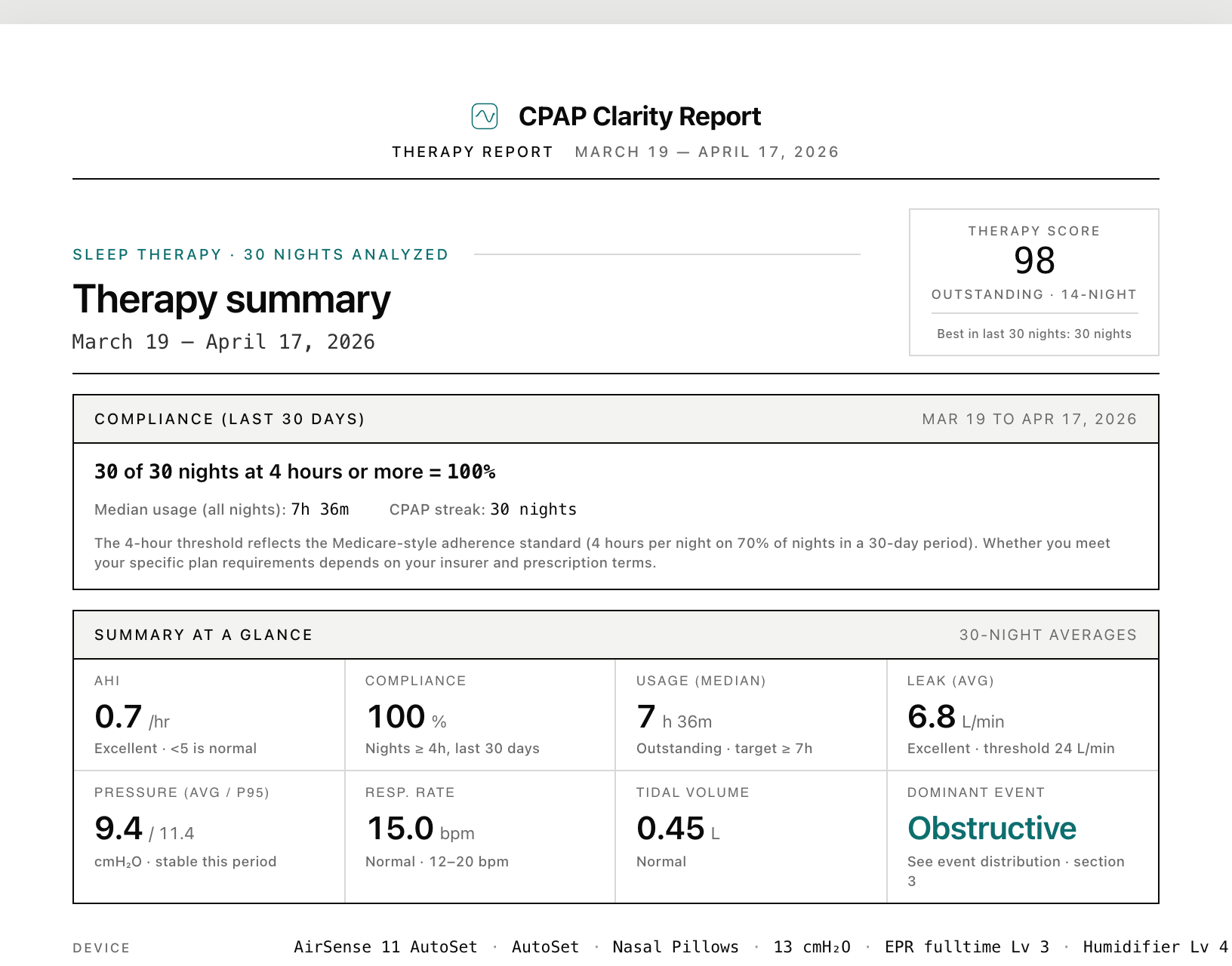
Here's what you get:
- AHI breakdown by event type: obstructive apneas, central apneas, and hypopneas shown separately, so your doctor can see exactly what's happening
- Leak and pressure metrics: averages, 95th percentiles, and color-coded status indicators
- Time-series charts: your entire night visualized, showing when events cluster and how pressure responds
- Plain-English narrative: a summary that explains your data in everyday language
You can download the report from the dashboard or the history page, and choose the period it covers: your last 30, 60, or 90 nights, everything you've imported, or a custom date range. Print it out or pull it up on your phone. Either way, your doctor will have everything they need.
Your data never leaves your device. No account required. No sign-up. Just insights.
How to generate the PDF in three minutes
- Open CPAP Clarity in your browser and drop in your CPAP's SD card folder (or upload the files).
- Click Download Full Report (on the dashboard or under "Share Your Report" on the History page). A small options panel opens: pick the period the report covers (last 30, 60, or 90 nights, all of your data, or a custom date range, useful when your doctor wants the weeks since a settings change), and optionally add your name, date of birth, and a short note so the clinic can file the report to your chart. Those details stay on your device and appear only in the PDF you export.
- Click Generate report and your browser will open its print dialog. Pick Save as PDF as the destination, then save the file. The report renders entirely in your browser; nothing is sent to a server.
Print the file or attach it in your clinic portal. If your portal rejects the upload for being too large, most clinics will accept the standard PDF directly, or you can save and attach it from your Files / Downloads folder.
How Often Should I See My Sleep Doctor?
After your initial CPAP titration and setup, most sleep physicians want a follow-up visit at 30 to 90 days to review early data and confirm the prescription is right. After that, annual follow-ups are standard for stable patients.
Reasons to request an earlier visit, even if your annual is months away:
- Your AHI has crept above 5 for more than two consecutive weeks. A week of bad nights happens; a sustained trend is a signal.
- You're waking with headaches, fatigue, or dry mouth that you didn't have before. These can point to leak, pressure, or comorbid issues your doctor should evaluate.
- You've had a significant change in body weight (commonly cited as 10% or more). Body composition changes affect required pressure; many people need a re-titration. The exact threshold is a clinical judgment, not a fixed guideline number.
- Your insurance is asking for a compliance re-attestation. Some plans require a clinician sign-off, not just download data.
- You feel like your therapy stopped working. Trust the signal. Schedule a visit.
If your sleep clinic uses ResMed AirView, your doctor may be reviewing your data remotely between visits. That doesn't replace the in-person conversation. It does mean they may already know about a trend you noticed; come prepared to discuss what you want to change, not just what is happening.
Multi-Night vs Multi-Month: Which Window Matters
A single night tells you almost nothing. A 30-night average tells you about your current therapy. A 6-month trend tells your doctor about your disease.
For routine follow-ups, bring two windows:
- The last 30 nights. Most clinics look at this window for current status. It smooths out one-off bad nights and reflects your current mask, pressure, and sleep environment.
- The last 6 months. This is where the story lives. If your AHI has slowly climbed from 2 to 6 over half a year, that is a different conversation than "you had a bad week".
A multi-night CPAP Clarity report includes both. If you are exporting from myAir, you will only get a rolling 30-night summary; the longer window requires SD card data. This is one of the most useful arguments for getting comfortable with the SD card workflow even if myAir is your daily check-in.
For specialty visits (a re-titration consult, a mask refit, a pulmonologist referral) bring the full 6 to 12 month trend. The specialist did not see your earlier data and the longer window prevents them from chasing a recent blip.
If Your Doctor Doesn't Want Your Data, Push Back Gently
It happens. Some clinicians are not used to patients bringing their own reports and will wave them off in favor of the AirView download they already pulled. A few ways to handle this without friction:
- Lead with the question, not the data. "I noticed my AHI has been around 6 for three weeks. Is that worth adjusting pressure for?" gets a different reception than handing over a 12-page PDF.
- Offer a one-line summary. "Usage is 7 hours, AHI is 6, leak is fine, pressure is hitting the ceiling." That is the entire conversation in 15 seconds. The PDF backs it up if they want to dig in.
- Ask what they prefer to see. Some clinics want the manufacturer's printout (myAir or AirView) for chart consistency. Others welcome the deeper breakdown. Asking respects their workflow.
- Know your rights. You are the patient. You have the right to access your own data and to bring it to a visit. If a clinician will not engage at all, that is a clinic-fit issue worth raising with your insurer or seeking a second opinion on. The AASM endorses shared decision-making between patient and provider as a core principle of PAP management.
The goal is not to play doctor. It is to make the 15 minutes you do get more useful for both of you.
What to Ask Your Doctor
With your data in hand, here are the questions that make your 15 minutes count:
- "Should my pressure be adjusted?" If your 95th percentile pressure is bumping against the top of your range, or your AHI is trending upward, ask about widening or shifting your pressure range.
- "Do I need a different mask?" If leak rates are consistently high despite proper fitting, a different mask type might solve the problem.
- "Are my events obstructive or central?" This matters because the treatment differs. Obstructive events respond to pressure increases. Central events may require a different approach entirely. Learn more about reading your CPAP data.
- "Should my EPR settings change?" EPR (Expiratory Pressure Relief) makes exhaling more comfortable by reducing pressure when you breathe out. If you're having trouble with central apneas or aerophagia (swallowing air), EPR adjustments can help.
- "Am I meeting insurance compliance?" Ask your doctor to confirm your data supports continued coverage.
Insurance Compliance: Know Your Numbers
Most U.S. insurers require you to demonstrate CPAP compliance during the first 90 days, and many continue to check periodically after that. The Medicare standard, which most private insurers mirror, is:
4 or more hours of use on at least 70% of nights over a rolling 30-day period within the first 90 days of therapy
That means at least 21 out of 30 nights with 4+ hours of wear time. Your usage data is the proof. If you're close to the threshold, knowing your exact numbers helps you and your doctor advocate to your insurer with confidence.
Two compliance specifics worth knowing:
- The clock starts on your first night of use, not on the day the equipment arrived. If you delayed starting, the 90-day window starts later.
- A compliance report from your doctor, not just raw download data, is usually what insurers want. That is one more reason the in-person visit matters: your clinician generates the signed report that satisfies the carrier.
If you fall short of compliance in the first 90 days, most insurers will require you to re-qualify (often by repeating the sleep study or trialing again). Catching a drift toward non-compliance at week 6 is recoverable. Discovering it at week 13 is not.
A Five-Minute Pre-Appointment Habit
Your sleep doctor wants to help, but they need data to do it well. Showing up with your AHI trends, usage hours, leak rates, and pressure data transforms a routine check-in into a meaningful conversation about your health.
Take five minutes before your appointment to pull your SD card and generate a report. Those five minutes can change the next six months of your therapy. And if it's been a while since you replaced your tubing, filters, or water chamber, stocking up on fresh supplies before your visit is a good habit.
Frequently Asked Questions
Will my doctor accept a report I generated myself instead of an official ResMed printout?
Most sleep clinics accept any clearly formatted report that shows the same metrics. A CPAP Clarity PDF includes the same per-night AHI, leak, pressure, and usage data that ResMed reports show, plus event breakdowns and time-series charts. If your clinic specifically requires a manufacturer report, ask whether you can supplement it with the deeper report rather than replace it.
Can I get CPAP data from my machine without an SD card slot?
Some travel CPAPs (like the ResMed AirMini) do not have an SD card slot. Those machines sync to the manufacturer app over Bluetooth, which is the only way to retrieve data. For full-feature home CPAPs (AirSense 10/11, AirCurve, most BMC and Löwenstein models), the SD card is the canonical data source.
How far back should my CPAP data go before a visit?
Bring at least 30 nights of recent data and, if you can, 6 months of trend data. The 30-night window reflects your current therapy. The 6-month window shows whether anything is drifting. If you are a new user with less than 30 nights, bring whatever you have; your doctor needs to see the baseline regardless.
What if my AHI looks high but I feel fine?
Tell your doctor exactly that. AHI is a number, not a verdict; how you feel matters too. Sometimes a higher AHI reflects an event type your therapy is not addressing (central apneas, for example). Sometimes the threshold is a guideline your specific case can flex on. Either way, the conversation is more productive than either number alone.
Should I bring my mask and machine to the appointment?
Ask your clinic in advance. Some doctors will inspect mask fit during the visit; others rely on photos or descriptions. Bringing the mask if it is easy to do (full-face and nasal masks travel fine in a small bag) gives the doctor an option without locking you in.
Can I share my data with my doctor before the visit?
Most clinics use a portal that accepts PDF uploads. Email is usually discouraged for health data. Ask your clinic for their preferred secure channel; sending the report ahead lets the doctor review it before you arrive, which often saves the most time.
Primary Sources
- American Academy of Sleep Medicine (AASM) clinical practice guideline on positive airway pressure therapy: Patil et al. 2019 (opens in new tab) covers the role of shared decision-making and the recommended follow-up cadence after PAP initiation.
- Centers for Medicare and Medicaid Services (CMS) compliance tips for CPAP devices and accessories (covers the documentation and usage standards most private insurers mirror): CMS provider compliance tips (opens in new tab).
- NHLBI patient overview of CPAP therapy and follow-up: nhlbi.nih.gov/health/cpap (opens in new tab).
Related Guides
See what your SD card reveals
Drop in your SD card data. ResMed, Philips, BMC, Löwenstein, Luna, Yuwell, and more. No account, no uploads, no cost.
Analyze your data